desic.creative 3Speak Podcast

desic.creative 3Speak Podcast

By desic.creative
Download on the App Store

desic.creative 3Speak Podcast episodes

  • Did you know that Distriator is already present in more than 30 countries? 🌍
    More than 500 business around the world rely on this application to transform every purchase into real rewards.
    In this animation, I take you on a trip around the world to see how far Distriator has come:
    🚩 The flags of each country,
    📊 A top with the most active countries.
    And above all, an invitation to be part of a community that earns as you shop.
    ***Distriator is not just an app, it's a movement.
    And you can be part of it.***
    -------------
    Más de 500 negocios de todo el mundo confían en esta aplicación para transformar cada compra en recompensas reales.
    En esta animación, te llevo de viaje por todo el mundo para que veas hasta dónde ha llegado Distriator:
    🚩 Las banderas de cada país,
    📊 Un top con los países más activos.
    Y sobre todo, una invitación a formar parte de una comunidad que gana mientras compras.
    ***Distriator no es solo una app, es un movimiento.
    Y tú puedes formar parte de él.***
    ![subportada.png](https://files.peakd.com/file/peakd-hive/desic.creative/23w31svB5q2yfq4pswbRwMAz1p516QhaRTPWmhBqg3GY86VWFr8WqnJsiUGJ6kE5DddVp.png)
    Traducido con https://www.deepl.com/
    ---
    1 min
  • Bordado digital: creatividad sin límites en Photoshop ✨✨[ENG-ESP]
    ![portda-de-video-2.png](https://files.peakd.com/file/peakd-hive/desic/23yTgwb7ihV34UrhjvWteZmHu2734tFzk7KSzryKvYp35e31nV4KdWHjpHn8TxTtvb9W5.png)
    Hola, me encanta poder compartir este video de esta nueva herramienta en photoshop siepre compartir con ustedes tutoriales es algo que me encanta. En este video te muestro cómo funciona la nueva herramienta de filtros paramétricos aplicada al mundo del bordado digital. Una opción poderosa, versátil y creativa que está revolucionando el diseño textil. ¡Los resultados son increíbles!
    **¿Había escuchado de esta herramienta?** si no la habías escuchado de ella déjame en los comentarios.
    --------------------
    Hello, I love to share this video of this new tool in photoshop always share with you tutorials is something that I love. In this video I show you how the new parametric filters tool works applied to the world of digital embroidery. A powerful, versatile and creative option that is revolutionizing textile design, the results are amazing!
    **Had you heard of this tool?** if you had not heard of it leave me in the comments.
    ![Bordado.png](https://files.peakd.com/file/peakd-hive/desic/AK4zvNpE46NZ6QNkqwcGZhUeBD5k9drDM8TtesAN7NhJAM7E6hC33x89chRGagf.png)
    2 min
  • Tendencias de Diseño Gráfico que Dominarán el 2025 🚀✨✨[ENG-ESP]
    ***Las tendencias en diseño gráfico siempre nos inspiran y nos abren un mundo de posibilidades para implementar en nuestros proyectos.***
    En este video, te compartiré algunas de las principales tendencias que están marcando el 2025.
    Este breve recorrido está lleno de inspiración y creatividad. Es un honor para mí poder compartirlo contigo este video, espero que lo disfrutes tanto como yo disfruté creándolo.
    **¡Nos vemos en el próximo video!**
    ---------
    ----------
    ## **English**
    ---------
    ----------
    ***Trends in graphic design always inspire us and open up a world of possibilities to implement in our projects.***
    In this video, I will share with you some of the main trends that are marking 2025.
    This brief tour is full of inspiration and creativity. I'm honored to share it with you, and I hope you enjoy it as much as I enjoyed creating it.
    **See you in the next video!**
    [Music Pixabay](https://pixabay.com/music/upbeat-happy-fun-upbeat-travel-background-music-for-videos-244591/)

    Traducido con https://www.deepl.com/
    3 min
  • Ahorra Tiempo con Presets en Lightroom/ Save Time with Presets in Lightroom 📷✨💕
    ![portada-de-Lightroom.png](https://files.peakd.com/file/peakd-hive/desic/23s9GfEcyTpPwZEPwJ5ddHTURiVXFHeBw78tkTyDkZrVweGqUcQaJqjGnN2emFzMpb9YK.png)
    **¡Hola! ¡Feliz comienzo de mes y de semana a todos!**
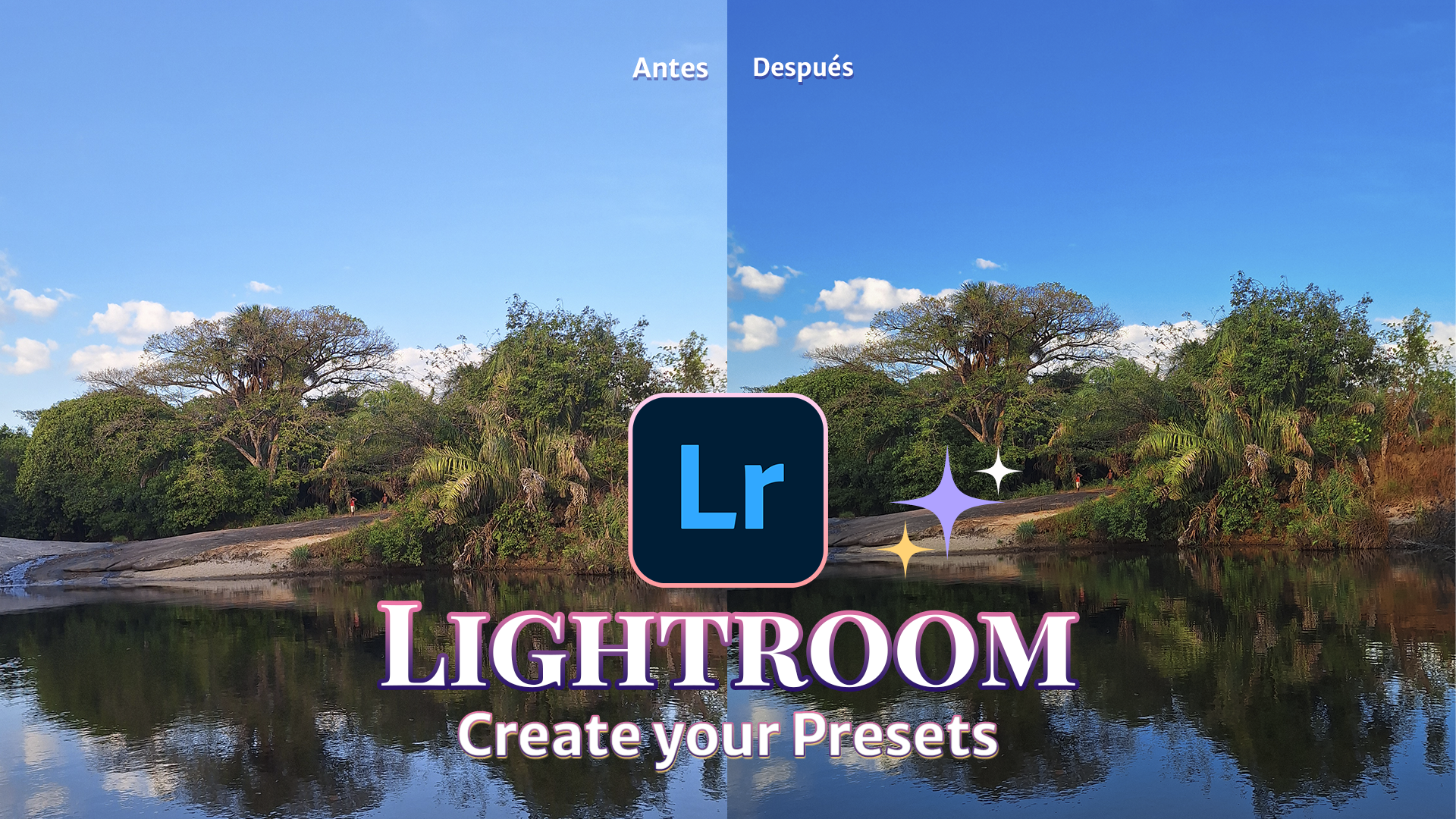
    Los ajustes preestablecidos en Lightroom son ajustes que te permiten editar fotos con un solo clic. En este vídeo os voy a enseñar a crear vuestros propios ajustes preestablecidos y a guardarlos para que podáis utilizarlos posteriormente en otras fotografías.
    La intención con este vídeo es mostrarte cómo crear y guardar un preset, ya que es algo muy útil a la hora de editar fotos. Aquí en Hive, es normal que subamos fotos y que estas sean editadas, y conocer una opción que te permita ahorrar tiempo a la hora de editarlas es lo mejor.
    > **Hello! Happy start of the month and of the week everyone!**
    > Presets in Lightroom are settings that allow you to edit photos with a single click. In this video, I will show you how to create your own presets and save them so you can use them later on other photographs.
    > The intention with this video is to show you how to create and save a preset, as it is something very useful when editing photos. Here at Hive, it is normal that we upload photos and that these are edited, and knowing an option that allows you to save time when editing them is the best.
    Por otro lado, hace unas semanas compartí un video hablando sobre los presets, si no has visto este video aquí te dejo el link.
    > On the other hand, a few weeks ago I shared a video talking about presets, if you have not seen this video here is the link.
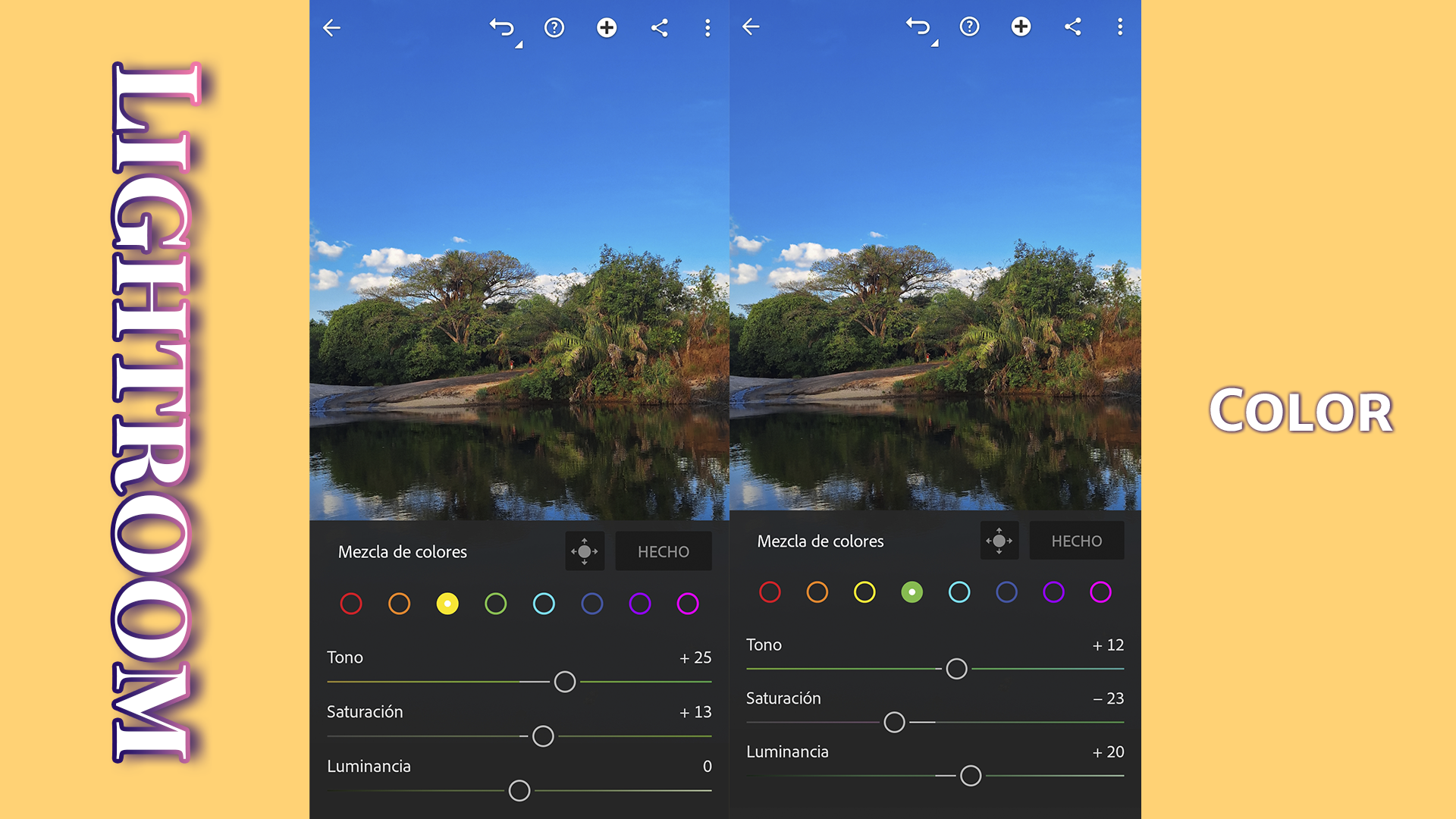
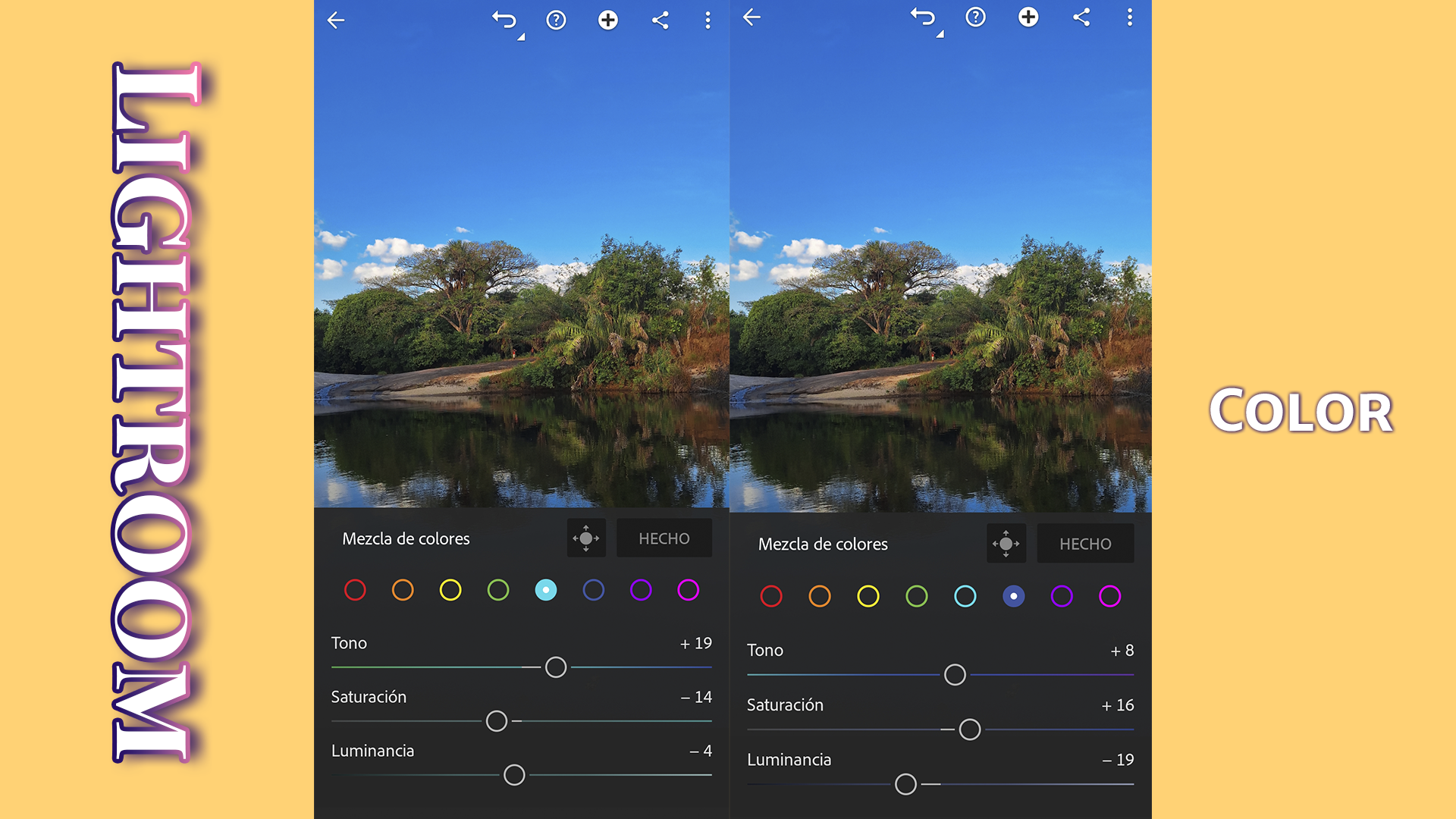
    **A continuación les comparto lo que significa cada ajuste que aplico a la foto que edité en el video, cabe mencionar que existen más ajustes en Lihgtroom que pueden utilizar.👇👇**
    > **Here below I share with you what each setting means that I apply to the photo that I edited in the video, it is worth mentioning that there are more settings in Lihgtroom that you can use.👇👇**
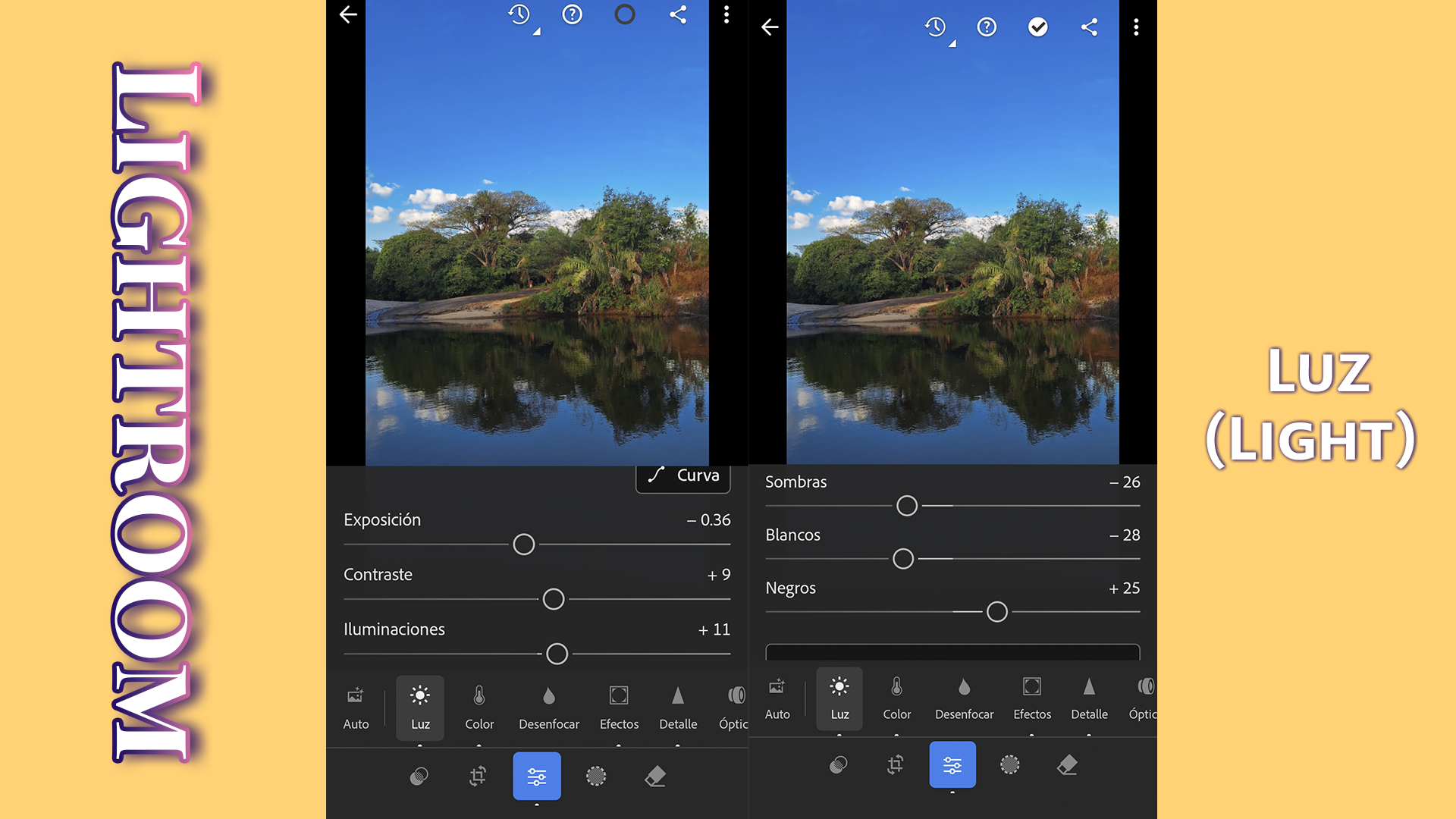
    ![1.1.png](https://files.peakd.com/file/peakd-hive/desic/246azgB6NkGUR5qAAVTfesKiLq1bt2wbCLiUBdPoQFs5SAcpokMABGaJVRU4tqcFVyFFF.png)
    **1. Luz (Light)**
    ***Exposición:*** Ajusta el brillo general de la foto.
    ***Contraste:*** Aumenta o disminuye la diferencia entre las zonas claras y oscuras.
    > ***Exposure:*** Adjusts the overall brightness of the photo.
    ***Contrast:*** Increases or decreases the difference between light and dark areas.
    ***Highlights:*** Adjusts the brightness of the lighter areas.
    ***Shadows:*** Adjusts the brightness of the darkest areas.
    ***Whites:*** Controls the lighter tones in the image.
    ***Blacks:*** Controls the darkest tones in the image.
    ![1.2.png](https://files.peakd.com/file/peakd-hive/desic/246aztbezLyBe4NDz6N3mbCWUvXHHhoEyxw9mSZySnz1ZiT36PCZUrczoxdNLeUpZuJ5k.png)
    ![2.3.png](https://files.peakd.com/file/peakd-hive/desic/246azkyULcBMjhSsVzroeQWVtLHSBkXppL3KF4kZrC7XyF5rDX87MH7zGNjFu9KDVi1vA.png)
    ![2.4.png](https://files.peakd.com/file/peakd-hive/desic/246azky991M2xYJZAHtGvtEwV2o1xaAYsQyb7jewsnJPNtpmo39gchhBcwAvypRtZNrfJ.png)
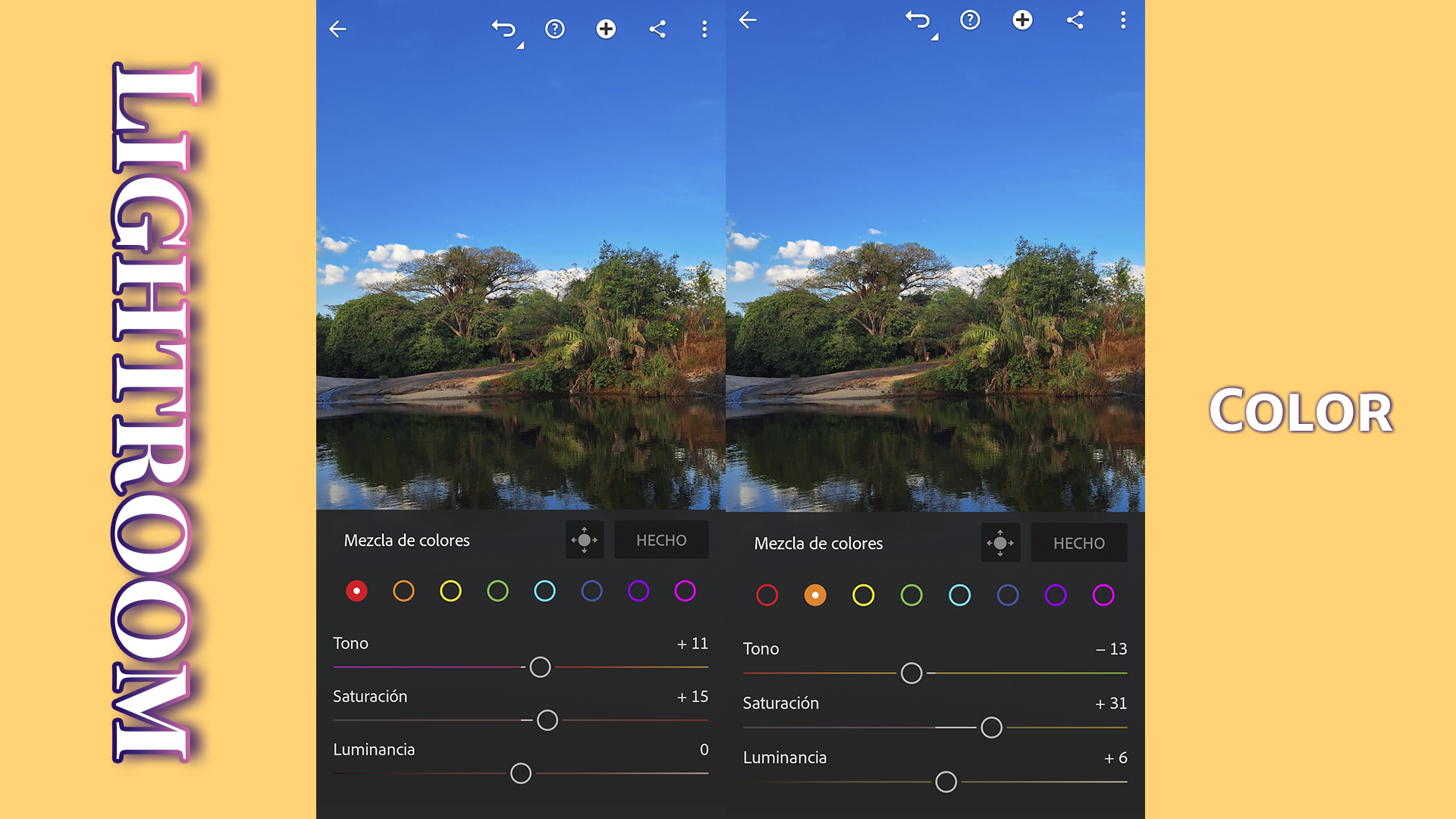
    **2. Color**
    ***Temperatura:*** Ajusta el balance de blancos hacia tonos más cálidos (amarillos) o más fríos (azules).
    ***Tinte:*** Corrige el balance de blancos ajustando el verde o el magenta.
    ***Saturación:*** Aumenta o disminuye la intensidad de todos los colores de la imagen.
    ***Intensidad:*** Ajusta la saturación de los colores menos saturados, evitando que los colores ya saturados sean demasiado intensos.
    > ***Temperature:*** Adjusts the white balance towards warmer (yellow) or cooler (blue) tones.
    ***Tint:*** Corrects the white balance by adjusting the green or magenta.
    ***Saturation***: Increases or decreases the intensity of all colors in the image.
    ***Vibrance:*** Adjusts the saturation of less saturated colors, preventing already saturated colors from becoming too intense.
    ![5.1.png](https://files.peakd.com/file/peakd-hive/desic/246b6oRfdmthYL6DxUk4NGcdRr6dGUhHVD7NeiXnw8rX9TXXRYmR8tuK6ZMW4SMD5vL16.png)
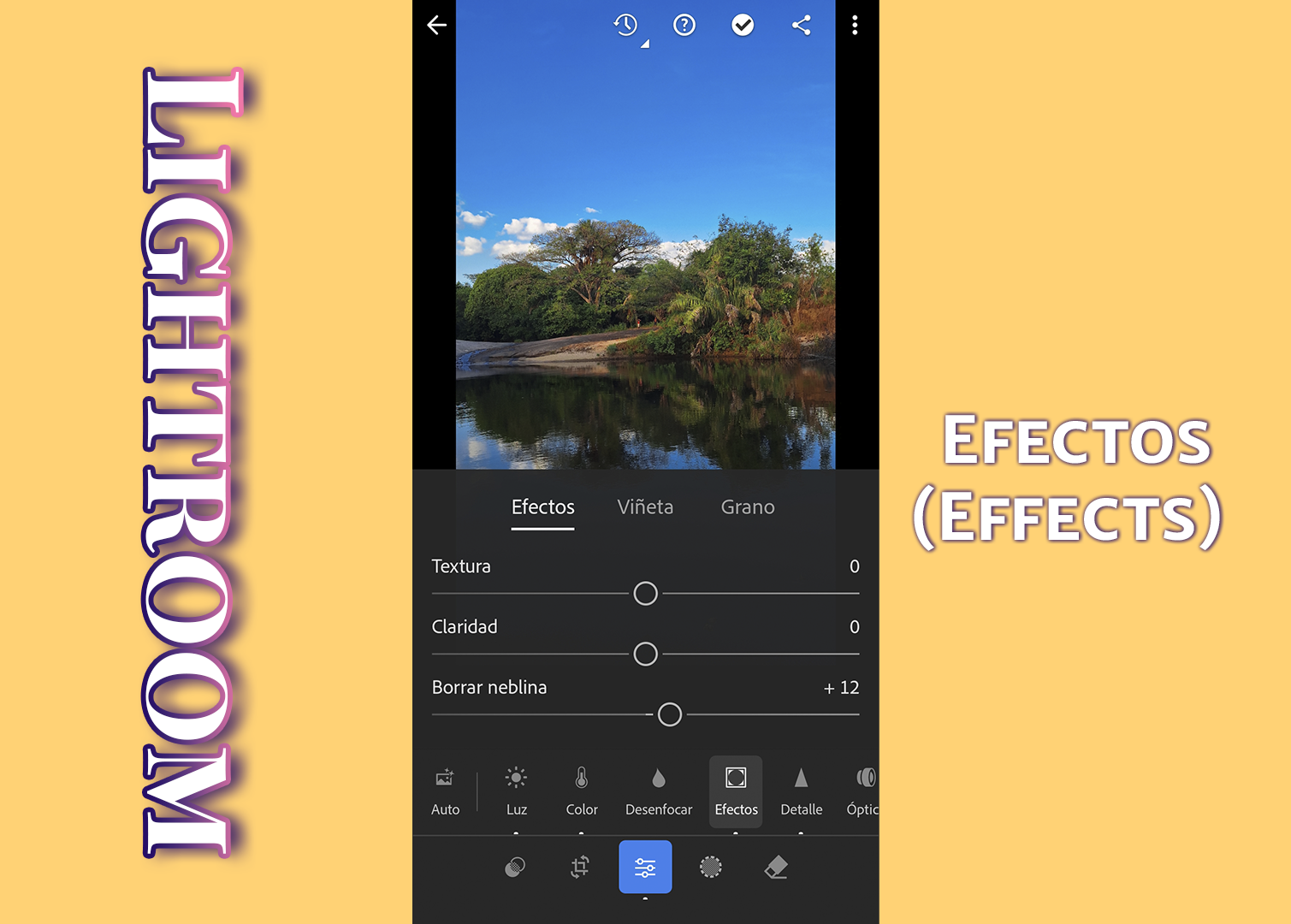
    **3. Effects (Effects)**
    ***Claridad:*** Añade o reduce el contraste de los tonos medios para dar un efecto nítido o suave.
    ***Desenfocar:*** Reduce o aumenta la neblina de la imagen.
    Viñeta: Oscurece o aclara los bordes de la imagen.
    ***Granulado:*** Añade una textura de grano para dar un aspecto más vintage.
    > ***Clarity:*** Adds or reduces midtone contrast to give a sharp or soft effect.
    ***Dehaze:*** Reduces or increases the haze in the image.
    Vignette: Darkens or lightens the edges of the image.
    ***Grain:*** Adds a grain texture to give a more vintage look.
    ![4.5.png](https://files.peakd.com/file/peakd-hive/desic/246b6oRfdmthYL76waH28eWGE73AkVrGMd8YnVrha3TBjx8Pv2TT74ZNTycCBusvPnk1V.png)
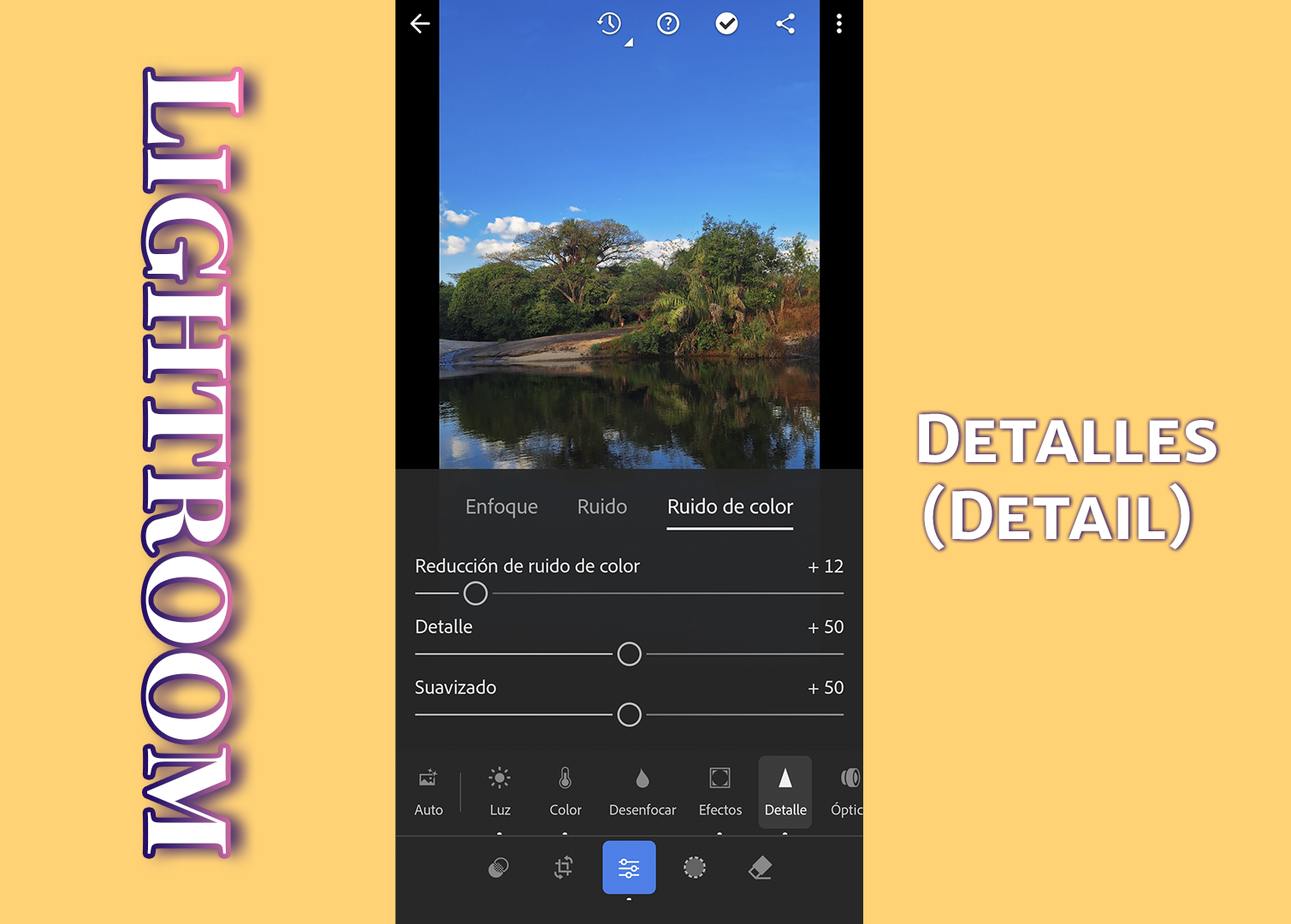
    **4. Detalles (Detalle)**
    ***Nitidez:*** Mejora la nitidez de los detalles.
    ***Reducción de ruido:*** Reduce el ruido digital de la imagen, útil para fotos tomadas con poca luz.
    ***Reducción de ruido de color:*** Elimina el ruido de color específico.
    > ***Sharpening:*** Improves the sharpness of details.
    ***Noise Reduction:*** Reduces digital noise in the image, useful for photos taken in low light.
    ***Color Noise Reduction (Color Noise Reduction):*** Eliminates specific color noise.
    Optics
    ***Lens Correction***: Corrects lens distortions, chromatic aberration and vignetting automatically if lens information is available.
    ***Remove Haze:*** Another option to adjust the clarity in the image.
    **Espero que disfrutéis de este vídeo y os resulte útil, ¡nos vemos en la próxima entrega! Hasta luego.**
    > **I hope you enjoy this video and find it useful, see you in the next installment! Bye bye.**

    ***Sígueme para más contenido.***

    4 min
  • Firefly new trend in creative world / Firefly nueva tendencia en el mundo creativo ✨
    ![desic-portada.png](https://files.peakd.com/file/peakd-hive/desic.creative/23wqfyyfQ2ZRphcTRkxH5dWsmVSArKVco88Dj7DMwhS4NY3MtnDaENDSud1uxuB9G5Ku6.png)
    Hola amigos espero que estén muy bien.
    En este video les hablo de **Firefly** un programa super top con inteligencia artificial (IA) de Adobe y es que con este programa, se pueden hacer grandes cosas, en el área del diseño gráfico muchos diseñadores están creando letras super creativas con inteligencia artificial entre otras cosas interesantes , aquí en este video les muestro como crear estas letras y les hablo de Firefly la la interfaz de este programa.
    ## **Aquí les comparto puntos exactos del tema**
    **1; 0:38** segundo te cuento que es Firefly.
    **2; 2:09** minutos te muestro la interfaz del programa.
    **3; 2:38** explico cómo crear materiales.
    **4; 2:57** paso a aplicar textura a letras o formas.
    **5; 11:32** Consejos para que tus letras queden perfectas.
    En un vídeo de 12 minutos, con toda la información que necesitas para crear letras increíbles. Espero sea de su agrado este video y que puedas ir a probar este gran programa de Adobe.
    ---------
    ----------
    ## **English**
    ---------
    ----------
    Hello friends I hope you are very well.
    In this video I talk about **Firefly** a super top program with artificial intelligence (AI) from Adobe and is that with this program, you can do great things, in the area of graphic design many designers are creating super creative letters with artificial intelligence among other interesting things, here in this video I show you how to create these letters and I talk about Firefly the interface of this program.
    ## **Here I share exact points of the topic**
    **1; 0:38** second I tell you what Firefly is.
    **2; 2:09** minutes I show you the interface of the program.
    **3; 2:38 **I explain how to create materials.
    **4; 2:57** step by step how to apply texture to letters or shapes.
    **5; 11:32** Tips to make your letters look perfect.
    In a 12 minutes video, with all the information you need to create amazing letters. I hope you like this video and that you can go and try this great program from Adobe.
    ![Firefly Text 3d chrome fluid shapes, isolated on white background. 16758.jpg](https://files.peakd.com/file/peakd-hive/desic.creative/AKU5boZ5eReRqsE3EDCvkvXxzxkXcRT4niTZ2zqmiXViFYNo1whBc9Ujo4axtmE.jpg)
    ![Firefly 3d crystal text with chromaticism on a black background 40954.jpg](https://files.peakd.com/file/peakd-hive/desic.creative/AJpfFn3j4FU6TZvyVB5Zag5UV2TPaUUM6gtMiwzSfvGtQwSYaxjz6WfjqQ7cUAe.jpg)
    ![Firefly texto en 3d de cristal con cromatismo sobre fondo negro 62316.jpg](https://files.peakd.com/file/peakd-hive/desic.creative/AK3a7abjBpH6TzLqspbZ4q8fKxGvdqqyjJ87QcKySiu82JfxKPfEuaQLYWaCSj2.jpg)
    [Music Pixabay](https://pixabay.com/fi/music/eeppinen-klassikko-inmenso-charles-michel-1771/)
    [Music Pixabay](https://pixabay.com/es/music/pop-indie-glow-of-happiness-155369/)
    [Music Pixabay](https://pixabay.com/es/music/corporativo-inspiring-motivational-happy-corporate-205112/)

    Traducido con https://www.deepl.com/
    13 min
  • One-click photo editing 🔥✨😏Edición fotográfica con un solo clic ✨Video in Spanish and text in ENG
    Hola amigos, les comparto un pequeño video donde les muestro como edito mis fotos **con un solo click** es una manera fácil de editar tus fotos en Lightroom permitiéndote ahorrar tiempo, mira el video y verás lo fácil que puede ser editar una foto.
    Si quieres aprender a editar tus fotos **con un solo click** y crear tus presets personalizados en Lightroom estate atento a mi próximo vídeo, donde te enseñaré paso a paso como puedes hacerlo y no te preocupes si no tienes para pagar una membresía en Lightron ya que esta aplicación tiene una versión gratuita.
    ***Espero que disfruten este video, nos vemos en el próximo, bye, bye.***
    ---------
    ----------
    ## **English**
    ---------
    Hi friends, I share with you a short video where I show you how I edit my photos **with one click** is an easy way to edit your photos in Lightroom allowing you to save time, watch the video and you will see how easy it can be to edit a photo.
    If you want to learn how to edit your photos **with one click** and create your custom presets in Lightroom stay tuned for my next video, where I will show you step by step how you can do it and don't worry if you don't have to pay for a Lightron membership as this application has a free version.
    ***I hope you enjoy this video, see you in the next one, bye, bye.***
    [Music Pixabay](https://pixabay.com/es/music/canguelo-funpower-167250/)

    Traducido con https://www.deepl.com/
    ---
    1 min
  • Animation: Happy Bitcoin Pizza Day
    Hoy es el Día del Pizza Bitcoin Day y quería compartir con ustedes una linda animación para esta fecha conmemorativa en la cripto comunidad, recordando cuando se compraron 2 pizzas con 10,000 BTC. Me encanta la pizza y para mí este día es perfecto para comer pizza.
    Soy amante de la pizza, de los videojuegos y por supuesto de Hive uní estas cosas para hacer esta animación. El videojuego que me inspiró es uno viejo, pero sé que a muchos les traerá buenos recuerdos: Jr. Pac-Man. Incluso busqué la música en Pixabay.
    ---------
    ## **English**
    ---------
    Espero que disfruten de esta animación que hice con mucho cariño para compartirla con todos ustedes y celebrar este gran día conmemorativo.
    Today is Bitcoin Day Pizza Day and I wanted to share with you a nice animation for this commemorative date in the crypto community, remembering when 2 pizzas were bought with 10,000 BTC. I love pizza and for me this day is perfect to eat pizza.
    I am a lover of pizza, video games and of course Hive I put these things together to make this animation. The video game that inspired me is an old one, but I know it will bring back fond memories for many: Jr. Pac-Man. I even looked up the music on Pixabay.
    I hope you enjoy this animation that I made with a lot of love to share with all of you and celebrate this great commemorative day.
    ------
    ------
    ----
    [Music Pixabay](https://pixabay.com/es/sound-effects/playing-pac-man-6783/)

    Traducido con https://www.deepl.com/
    1 min
  • What Lightroom is and why you should use it ✨Qué es Lightroom y por qué debería utilizarla
    ![foto-portada-Lightroom.jpg](https://files.peakd.com/file/peakd-hive/desic.creative/23u64uTVnpvbhmzB9UW9yNLb4Fw5aAuhWKBUpbN3XBQd6yZE6WonjtKGJtnTo7fAZ7bZX.jpg)
    Hola feliz viernes, en este short video te hablo de mis razones por las que debes usar Adobe Lightroom para editar tus fotos, ya que esta es una increíble herramienta de edición fotográfica la cual es muy intuitiva y lo mejor de todo es que tiene una versión gratuita.
    Sé que la mayoría de nosotros editamos nuestras fotos para subirlas aquí en Hive y por esta razón te recomiendo que uses Adobe Lightroom y en este video te doy mis razones para usar esta aplicación.
    **Espero que disfruten este video y les sea de utilidad. Nos vemos en la próxima entrega Bye, bye.**
    ---------
    ## **English**
    ---------
    Hello happy Friday, in this short video I talk you about my reasons why you should use Adobe Lightroom to edit your photos, because this is an amazing photo editing tool which is very intuitive and best of all it has a free version.
    I know that most of us edit our photos to upload them here on Hive and for this reason I recommend you to use Adobe Lightroom and in this video I give you my reasons to use this application.
    **I hope you enjoy this video and find it useful. See you in the next installment Bye, bye.**
    ------
    ------
    ----
    [Music Pixabay](https://pixabay.com/es/music/danza-beachside-reflections-161788/)

    Traducido con https://www.deepl.com/
    ---
    3 min
  • Hack : Learn how to add hair with Photoshop ✨ Hack : Aprende a agregar cabello con Photoshop
    ![PORTADA-PARA-VIDEO.png](https://files.peakd.com/file/peakd-hive/desic.creative/23z79NvV5wdaSVhGAnDFJmq1r5YhvuEP7ufyowCp4qvQW9YdfrmqTTkaUxbPADj7L5B8h.png)
    Hola! ¿Alguna vez te has preguntado cómo te verías con un nuevo peinado? O incluso si no tienes cabello, ¡cómo te verías con uno! ¡Pues ahora puedes descubrirlo!
    Hoy os traigo un pequeño vídeo donde compartiré con vosotros un divertido truco sobre cómo añadir pelo a una persona que no lo tiene en una imagen, utilizando Adobe Photoshop. Es super fácil de hacer con la nueva versión beta de Photoshop, que cuenta con inteligencia artificial, aquí les compartiré como se hace y durante el video les mostraré diferentes looks que aplico sobre una imagen.
    **Espero que disfruten este video y les sea de utilidad. Nos vemos en la próxima entrega Bye, bye.**
    ---------
    ## **English**
    ---------
    Hi! Have you ever wondered what you would look like with a new hairstyle? Or even if you don't have hair, how you would look with one! Well now you can find out!
    Today I'm bringing you a little video where I'll share with you a fun trick on how to add hair to a person who doesn't have it in an image, using Adobe Photoshop. It's super easy to do with the new beta version of Photoshop, which has artificial intelligence, here I will share with you how it's done and during the video I will show you different looks that I apply on an image.
    ***I hope you enjoy this video and find it useful, see you in the next installment bye, bye.***
    ------
    ------
    ----
    [Music Pixabay](https://pixabay.com/music/rock-corporate-party-rock-203112/)

    Traducido con https://www.deepl.com/
    7 min
  • Tutorial: How to create Glitch Effect After Effects✨Cómo crear efecto Glitch en After Effects
    ![Comp 1_6.gif](https://files.peakd.com/file/peakd-hive/desic/23vsE9X8Xtqx5P8GPq6CbFgGLiAQMqkADBqHLH3ezwuxvceScfq82eqnYnY9DKpWm9FjB.gif)
    Hola amigos, en este video les comparto un tutorial de como hacer el **Efecto Glitch en After Affects**, hace unas semanas les compartí un tutorial de como renderizar un gif desde After Effects y en ese video usé esta animación como ejemplo exportándola en formato Gif y les comenté que más adelante les compartiría como hacer este efecto y como lo prometí les comparto este video mostrándoles paso a paso como hacer este increíble Efecto.
    ***Espero que disfruten este video y les sea de utilidad, nos vemos en la próxima entrega bye, bye.***
    ---------
    ## **English**
    ---------
    Hello friends, in this video I share with you a tutorial on how to make the **Glitch Effect in After Affects,** a few weeks ago I shared with you a tutorial on how to render a gif from After Effects and in that video I used this animation as an example exporting it in Gif format and I told you that later I would share with you how to make this effect and as I promised I share with you this video showing you step by step how to make this incredible effect.
    ***I hope you enjoy this video and find it useful, see you in the next installment bye, bye.***
    ------
    ------
    ----
    [Music Pixabay](https://pixabay.com/es/music/search/only-forward/)

    Traducido con https://www.deepl.com/
    ---
    7 min

About desic.creative 3Speak Podcast

From the publisher's feed

Listen and watch the latest videos from desic.creative. Hosted by 3Speak.tv, the free speech video platform.