Blind Level Tech

Blind Level Tech

Download on the App Store

Blind Level Tech episodes

  • BLT Bite: Demonstrating the new voiceover tootorial in iOS18
    In this episode of BLT Byte, host Evan Starnes introduces the new interactive VoiceOver tutorial that comes with iOS 18. He discusses its features, including basic navigation instructions, configuration options, and the ability to save progress. The tutorial aims to help new users get started with VoiceOver, covering essential gestures and commands. Evan shares his hands-on experience with the tutorial and highlights its potential to assist users in navigating their iPhones more effectively. The episode concludes with a teaser for a more in-depth discussion on iOS 18 in future episodes.
    Takeaways
    • The new VoiceOver tutorial is interactive and user-friendly.
    • Users can configure settings like speaking rate in the tutorial.
    • The tutorial saves your progress, allowing for a seamless experience.
    • Basic navigation commands are covered in the tutorial.
    • VoiceOver helps users activate items on their iPhone.
    • The tutorial includes practice pages for hands-on learning.
    • Advanced features are not covered, focusing instead on basics.
    • The tutorial is designed for new VoiceOver users.
    • Evan emphasizes the importance of accessibility in technology.
    • Future episodes will delve deeper into iOS 18 features.
    Chapters00:00Introduction to the VoiceOver Tutorial02:56Exploring the Interactive Features of iOS 18 VoiceOver05:23Navigating the VoiceOver Tutorial: A Hands-On Experience
    ★ Support this podcast ★
    6 min
  • BLT Bite: Demonstrating the new voiceover tootorial in iOS18
    In this episode of BLT Byte, host Evan Starnes introduces the new interactive VoiceOver tutorial that comes with iOS 18. He discusses its features, including basic navigation instructions, configuration options, and the ability to save progress. The tutorial aims to help new users get started with VoiceOver, covering essential gestures and commands. Evan shares his hands-on experience with the tutorial and highlights its potential to assist users in navigating their iPhones more effectively. The episode concludes with a teaser for a more in-depth discussion on iOS 18 in future episodes.
    Takeaways
    • The new VoiceOver tutorial is interactive and user-friendly.
    • Users can configure settings like speaking rate in the tutorial.
    • The tutorial saves your progress, allowing for a seamless experience.
    • Basic navigation commands are covered in the tutorial.
    • VoiceOver helps users activate items on their iPhone.
    • The tutorial includes practice pages for hands-on learning.
    • Advanced features are not covered, focusing instead on basics.
    • The tutorial is designed for new VoiceOver users.
    • Evan emphasizes the importance of accessibility in technology.
    • Future episodes will delve deeper into iOS 18 features.
    Chapters00:00Introduction to the VoiceOver Tutorial02:56Exploring the Interactive Features of iOS 18 VoiceOver05:23Navigating the VoiceOver Tutorial: A Hands-On Experience
    6 min
  • Lets Talk Accessible Recorders
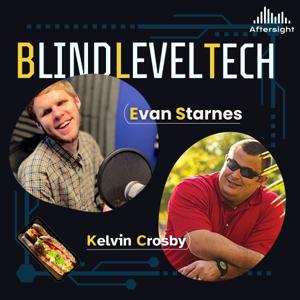
    In this episode, Evan and Kelvin take a dive into the world of field recorders from an accessibility perspective. We'll answer the most common questions a blind or low-vision person might have when purchasing a shiny new recorder, like does it talk, and have an intuitive interface, and of course, how does it sound.
    ★ Support this podcast ★
    33 min
  • Lets Talk Accessible Recorders
    In this episode, Evan and Kelvin take a dive into the world of field recorders from an accessibility perspective. We'll answer the most common questions a blind or low-vision person might have when purchasing a shiny new recorder, like does it talk, and have an intuitive interface, and of course, how does it sound.
    33 min
  • BLT BIte: Talkback Shortcut on Android
    In this BLT Byte episode, host Evan Starnes provides a quick guide on setting up the TalkBack accessibility shortcut for Android devices. Using a Google Pixel 5, Evan walks listeners through the process of activating TalkBack during the initial setup of a new device and explains how to enable it on a device that’s already been configured. He highlights the accessibility button feature, available at the bottom of the screen, and demonstrates the volume key shortcut, which is particularly useful for blind users. Evan also notes that the setup process may vary slightly depending on the brand of the Android device.
    ★ Support this podcast ★
    5 min
  • BLT BIte: Talkback Shortcut on Android
    In this BLT Byte episode, host Evan Starnes provides a quick guide on setting up the TalkBack accessibility shortcut for Android devices. Using a Google Pixel 5, Evan walks listeners through the process of activating TalkBack during the initial setup of a new device and explains how to enable it on a device that’s already been configured. He highlights the accessibility button feature, available at the bottom of the screen, and demonstrates the volume key shortcut, which is particularly useful for blind users. Evan also notes that the setup process may vary slightly depending on the brand of the Android device.
    5 min
  • BLT BITE: Olympus DM 720
    Summary
    The Olympus DM720 digital voice recorder is a capable device with three mics and the ability to record in MP3 or WAV format. However, it is not the most accessible recorder for blind or low vision users. The new Zoom Essential Series of recorders, such as the H1E, H4E, and H6E, are recommended for accessibility. The Olympus DM720 has a startup chime and a speaker that is not very good for playback but is useful for monitoring. The recorder has a menu that can be navigated using the buttons below the screen, and it provides beep feedback. Folders and files can be accessed, but the date and time of recordings are not announced. The recorder has a record button, a stop button, and the ability to pause and resume recordings. It also provides a long beep when running out of memory.
    Chapters
    00:00 Introduction to the Olympus DM720 Digital Voice Recorder
    01:01 Accessibility Considerations for Voice Recorders
    03:08 Navigating the Menu and Accessing Folders and Files
    05:08 Recording and Playback Features of the Olympus DM720
    06:29 Recommended Voice Recorders for Accessibility
    ★ Support this podcast ★
    8 min
  • BLT BITE: Olympus DM 720
    Summary
    The Olympus DM720 digital voice recorder is a capable device with three mics and the ability to record in MP3 or WAV format. However, it is not the most accessible recorder for blind or low vision users. The new Zoom Essential Series of recorders, such as the H1E, H4E, and H6E, are recommended for accessibility. The Olympus DM720 has a startup chime and a speaker that is not very good for playback but is useful for monitoring. The recorder has a menu that can be navigated using the buttons below the screen, and it provides beep feedback. Folders and files can be accessed, but the date and time of recordings are not announced. The recorder has a record button, a stop button, and the ability to pause and resume recordings. It also provides a long beep when running out of memory.
    Chapters
    00:00 Introduction to the Olympus DM720 Digital Voice Recorder
    01:01 Accessibility Considerations for Voice Recorders
    03:08 Navigating the Menu and Accessing Folders and Files
    05:08 Recording and Playback Features of the Olympus DM720
    06:29 Recommended Voice Recorders for Accessibility
    8 min
  • BeMyAI and All the Updates
    Summary
    In this episode of Blind Level Tech, Evan Starnes interviews Joe Weber from Be My Eyes. They discuss the latest updates and features of Be My AI, including the integration of GPT-4.0 and the expansion to Windows desktop. They also talk about the future plans of Be My Eyes, including the integration of wearables. The conversation highlights the importance of privacy and ethical use of data in AI technology. The episode ends with the sandwich of the week segment.
    Takeaways
    Be My AI, the AI tool integrated into Be My Eyes, is continuously improving and becoming more responsive.
    Be My AI is being used by companies like Microsoft and Unilever to provide customer support through the app.
    Be My AI is planning to integrate with wearables in the future.
    Be My Eyes prioritizes privacy and ethical use of data in their AI models.
    The sandwich of the week is a chicken bacon ranch wrap.
    Chapters:
    00:00 Introduction and Overview
    02:01 Be My AI: A Review and Preview
    04:22 The Growth and Adoption of Be My AI
    05:49 Be My AI and Support from Brands
    07:47 The Impact of Be My AI on Call Resolution Time
    09:38 The Advancements in Be My AI with GPT-4.0
    16:16 Introducing Be My AI for Windows Desktop
    19:33 The Future of Be My AI: Integration with Wearables
    23:56 Privacy and Ethical Use of Data
    27:34 Sandwich of the Week: Chicken Bacon Ranch Wrap
    29:48 Closing Remarks and Future Updates
    ★ Support this podcast ★

    32 min
  • BeMyAI and All the Updates
    Summary
    In this episode of Blind Level Tech, Evan Starnes interviews Joe Weber from Be My Eyes. They discuss the latest updates and features of Be My AI, including the integration of GPT-4.0 and the expansion to Windows desktop. They also talk about the future plans of Be My Eyes, including the integration of wearables. The conversation highlights the importance of privacy and ethical use of data in AI technology. The episode ends with the sandwich of the week segment.
    Takeaways
    Be My AI, the AI tool integrated into Be My Eyes, is continuously improving and becoming more responsive.
    Be My AI is being used by companies like Microsoft and Unilever to provide customer support through the app.
    Be My AI is planning to integrate with wearables in the future.
    Be My Eyes prioritizes privacy and ethical use of data in their AI models.
    The sandwich of the week is a chicken bacon ranch wrap.
    Chapters:
    00:00 Introduction and Overview
    02:01 Be My AI: A Review and Preview
    04:22 The Growth and Adoption of Be My AI
    05:49 Be My AI and Support from Brands
    07:47 The Impact of Be My AI on Call Resolution Time
    09:38 The Advancements in Be My AI with GPT-4.0
    16:16 Introducing Be My AI for Windows Desktop
    19:33 The Future of Be My AI: Integration with Wearables
    23:56 Privacy and Ethical Use of Data
    27:34 Sandwich of the Week: Chicken Bacon Ranch Wrap
    29:48 Closing Remarks and Future Updates
    32 min

About Blind Level Tech

From the publisher's feed

Where accessibility meets innovation. Hosted by Liam Erven, Blind Level Tech explores the latest in assistive technology, accessible design, and everyday tools that empower the blind and low-vision community. Each episode dives into real stories, expert insights, and practical solutions—from screen readers and AI tools to mobility tech and inclusive apps. Whether you’re blind, low vision, a professional in the accessibility space, or simply curious about how technology is reshaping lives, this show offers fresh perspectives and actionable takeaways.

More shows like Blind Level Tech

No Entries by Aftersight

No Entries

1 Listeners

High Country News by Aftersight

High Country News

2 Listeners

The Christian Science Monitor by Aftersight

The Christian Science Monitor

3 Listeners

Opera News by Aftersight

Opera News

1 Listeners

Colorado Kitchen Stories by Aftersight

Colorado Kitchen Stories

1 Listeners

Denver Urban Spectrum by Aftersight

Denver Urban Spectrum

3 Listeners

Prairie Times by Aftersight

Prairie Times

1 Listeners

No Entries by Aftersight

No Entries

1 Listeners

50 Plus Marketplace FrontRange by Aftersight

50 Plus Marketplace FrontRange

1 Listeners

No Entries by Aftersight

No Entries

1 Listeners

National Geographic en Español by Aftersight

National Geographic en Español

15 Listeners

No Entries by Aftersight

No Entries

1 Listeners

No Entries by Aftersight

No Entries

1 Listeners

Commerce City Connected by Aftersight

Commerce City Connected

0 Listeners

Navigating Life with Vision Loss by Aftersight

Navigating Life with Vision Loss

5 Listeners

No Entries by Aftersight

No Entries

0 Listeners

No Entries by Aftersight

No Entries

0 Listeners

No Entries by Aftersight

No Entries

0 Listeners

Volunteer Spotlight by Aftersight

Volunteer Spotlight

0 Listeners